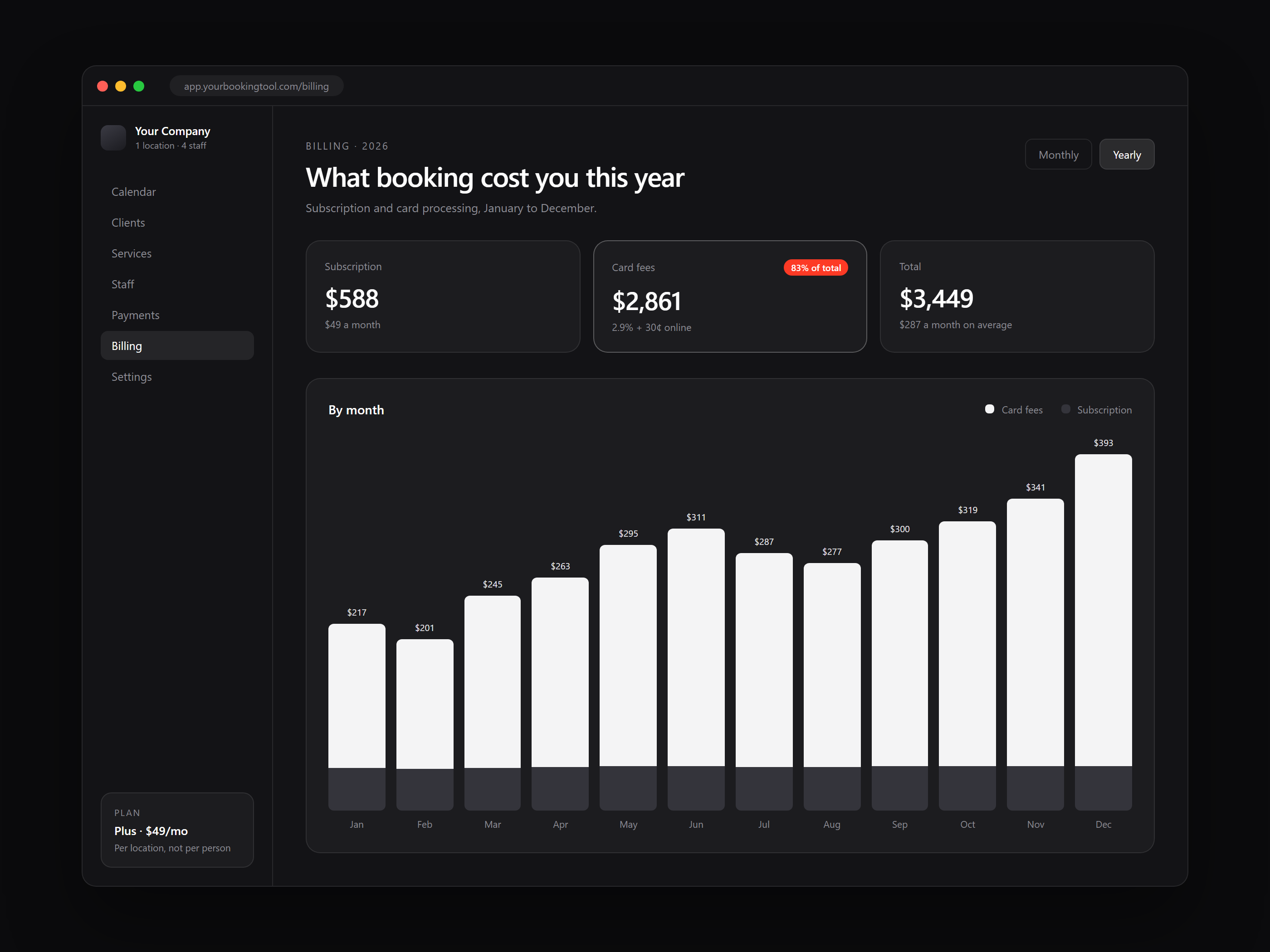
For most small businesses, an off-the-shelf booking tool costs between $0 and about $150 a month for one location with a small team, more as your team grows on tools that charge per person, plus card processing fees on every payment you take through it. A custom booking system costs more up front, and what it costs depends on what it needs to do. Which one is cheaper depends on how many staff you have, how much money runs through your bookings, and how much you care about owning the experience your clients see.
Below are the current prices, in US dollars, for five popular tools, taken from each company's own pricing page on October 1, 2026, plus the costs that do not show up on the price tag.
Key Takeaways
- The monthly fee is usually the small part. Once you take more than a few dozen $50 online payments a month, card fees cost more than the subscription.
- Several tools charge per staff member, so the bill grows every time you hire.
- Off-the-shelf is the right call for most new or very small businesses.
- Custom starts to pay off when you have several staff, steady online payments, or booking rules no app handles well.
What the popular booking tools cost in 2026
Prices change often, so treat these as a snapshot. Every price and fee here is in US dollars and was read off the vendor's own pricing page on October 1, 2026.
Square Appointments (pricing page)
- Free: $0 a month per location. Card fees: 2.6% + 15¢ in person, 3.3% + 30¢ online.
- Plus: $49 a month per location. Card fees: 2.5% + 15¢ in person, 2.9% + 30¢ online.
- Premium: $149 a month per location. Card fees: 2.4% + 15¢ in person, 2.9% + 30¢ online.
Calendly (pricing page)
- Free for one event type.
- Standard: $12 per seat a month billed monthly, or $10 billed yearly.
- Teams: $20 per seat a month billed monthly, or $16 billed yearly.
- Takes payments by connecting Stripe or PayPal, which charge their own processing fees.
Acuity Scheduling (pricing page)
- Starter (1 calendar): $20 a month, or $16 a month paid yearly.
- Standard (up to 6 calendars): $34 a month, or $27 a month paid yearly.
- Premium (up to 36 calendars): $61 a month, or $49 a month paid yearly.
Vagaro (pricing page)
- Priced by how many staff you have, for one location. Just you: $23.99 a month, shown as an "exclusive rate for the first 6 months" next to a crossed out $30.00.
- Each extra staff member adds $10 a month on the listed prices, up to 7 or more staff at $83.99 a month (crossed out price $90.00).
Fresha (pricing page)
- Independent: $19.95 a month.
- Team: $14.95 per team member a month.
- Card fees: 2.79% + $0.20 online, from 2.29% + $0.20 in person.
- New clients who find you through the Fresha marketplace cost a one-time 20% commission, with a $6 minimum per client. Returning clients are free.
What a four person shop actually pays each month
Sticker prices are hard to compare because each tool charges a different way. So take one business, a salon or studio with four people taking bookings, priced on each tool's monthly billing:
- Square Appointments Plus: $49 (priced per location, not per person)
- Calendly Standard: $48 (4 seats at $12)
- Acuity Standard: $34 (up to 6 calendars)
- Vagaro, 4 staff: $53.99 during the intro period, with $60.00 shown as the crossed out price
- Fresha Team: $59.80 (4 members at $14.95)
On subscription alone, every one of these is affordable. For most shops taking online payments, the subscription is not the biggest cost. Card fees are.
The cost most owners miss: card fees
If clients pay or leave a deposit when they book, every payment carries a processing fee. Take a simple example: 200 online bookings a month at $50 each, which is $10,000 a month going through the system.
- On Square Plus (2.9% + 30¢ online), that works out to about $350 a month in card fees.
- On Fresha (2.79% + $0.20 online), it works out to about $319 a month.
That is my own arithmetic from the published rates, not a quote from either company. But it shows the pattern: at that volume, card fees cost five to seven times more than the subscription. Over a year, that is roughly $3,800 to $4,200 in fees alone.
You pay card fees with a custom system too, because someone still has to process the card. The difference is that you choose the processor, and at higher volume you can ask it for a better rate, instead of taking whatever rate the app sets for businesses your size.
The costs that are not money
Some costs never show up on an invoice:
- Your clients live on someone else's platform. Marketplace apps like Fresha bring you new clients, and that is useful. They also put your business next to your competitors in the same app.
- You follow their rules. Deposit rules, cancellation windows, package deals, and how the booking page looks are limited to the settings they offer.
- Moving later is painful. Your history and reviews live inside their system, and exports rarely bring everything across.
- Prices change. Vagaro shows a lower rate for the first six months. Budget on the higher crossed out price to be safe.
When an off-the-shelf tool is the right choice
For a lot of businesses, a ready-made tool is the smart move, and I would tell you that on a call:
- You are just starting out, or it is just you.
- Most of your clients pay in person.
- Your services are simple: pick a time, show up, pay.
- You want new clients from a marketplace and are fine paying for them.
If that is you, start with one of the tools above. Square's free plan or Acuity's Starter plan is enough for many solo businesses.
When a custom booking system pays off
Custom makes sense when the off-the-shelf costs and limits start stacking up:
- You have several staff, so per person pricing keeps growing.
- The extras keep adding up, like marketplace commissions on new clients and paid add-ons on top of the plan.
- Your booking rules do not fit an app. Think memberships, packages, multi-step services, rooms or equipment that need scheduling, or intake forms tied to a specific service. That is the kind of thing a custom build is for.
- You want the booking to look and feel like your brand, on your own website, without a competitor's app sitting in front of it.
- You want to own your client data and decide for yourself where it lives.
A custom system is a one-time build plus an ongoing cost for hosting and upkeep. The right comparison is not this month's subscription against the build price. It is what you will pay the app, plus its fees and limits, over the next three to five years.
How to decide
- Add up what you pay today: subscription, card fees, marketplace commissions, and any add-ons.
- Multiply your monthly total by 36 for a three year view, or 60 for five years.
- List the things your current tool will not let you do that cost you bookings.
If that three year number is small next to a custom quote and the list is short, keep the tool you have. If the number is big or the list is long, it is worth getting a custom quote to compare.
If you want a second opinion, LTF Technologies does a free project audit. Tell me what you use today and what it costs, and I will tell you in plain words whether custom is worth it for your business, and what it would take. You can also see how LTF Technologies approaches online booking systems.